
Coming Soon - AI can "Totally Control" Your Canvas
I was recently doom-scrolling browsing through my LinkedIn feed and encountered a smug post by someone in the Canvas family:
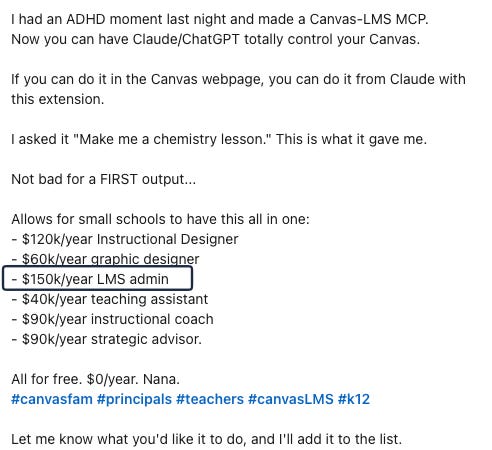
Normally I disregard self-congratulatory humblebrag posts. I often roll my eyes at the one-AI-to-rule-them-all hyperbole from LMS “thought leaders”. But I couldn’t look away from the audacity of listing all the positions a late night vibe-coding session could replace and the money a school can save.
(By the way, if your institution pays $150k for a Canvas Admin, please send me an email at canvasinsider@protonmail.com. I’d like to learn more!)
I’ve been immersed in the Canvas LMS support ocean for over nine years. As you might have observed, I’ve had some experience with leveraging AI as a Canvas Admin. Obviously, an AI agent can help a school:
Quickly access knowledge content to self-solve a course issue
Quickly locate online directions to create or modify course content
Quickly revise course content per customized directions
I am doubtful that an AI agent can assess a client’s technology skillset based on previous interactions and experience with prior-term courses:
Hi Chris....this has happened more than once...my comment in speedgrader PRINTS ONLY ONE WORD PER LINE OR gibberish in 5 columns. I write my comment for one student in speedgrader and submit, and then I want to copy and paste that comment into another student’s (to edit), and sometimes, it is literally gibberish
Thank you!
Professor Plum
An AI agent cannot genuinely understand a client’s angst in not being able to solve a problem with their course and respond with customized suggestions for their course issue:
I have grown frustrated with this anti-feature of Canvas, and I am hoping there is a reasonable workaround. Here is the problem. I often need to insert a table into an assignment, announcement, whatever. The Rich Text interface is limited, so I switch to HTML mode. I can switch back and forth to make sure that the HTML renders the way that I want, then I post it. Canvas then inserts a style on every single <td> and <th> in the table. This is not what I want, and I am tired of going back into the editor to remove the style. How can I make it stop changing stuff?
And I’m pretty sure an AI Agent can’t interpret a client’s email or ticket request containing…unclear…communication:
Chris,
Could you kindly roll [Abbreviated Course Title] (2024)
Term: Default Term
Into Summer 2025 [Abbreviated Course Title]
Thanks...we have students already committed, and we need to get the Canvas going.
A late night vibe coding session connecting an AI agent with a Canvas LMS cannot be a valid substitute for a full-time Canvas Administrator who knows their customers. A self-created MCP cannot replace a human with multiple years of fixing unique course issues. And I scoff at how an AI agent would comprehend client lingo in describing their problems. In 2026, nothing beats a knowledgeable, experienced Canvas Admin who knows the nuances and uniqueness of your institution’s LMS and clientele.
Thanks for your time,
-Chris